Pop Beat: Star Hits & Music
Supercharge MobileMusic
4.5105.00 Reviews
- Version
- 5.8.0
- Installs
- 100.00K
- Age Rating
- Everyone
Screenshots
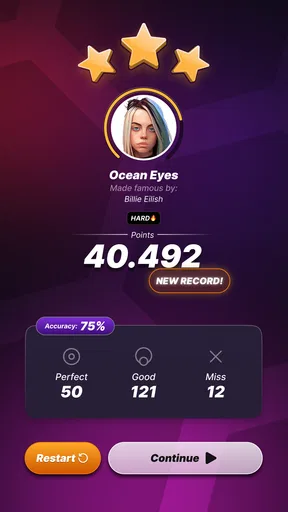
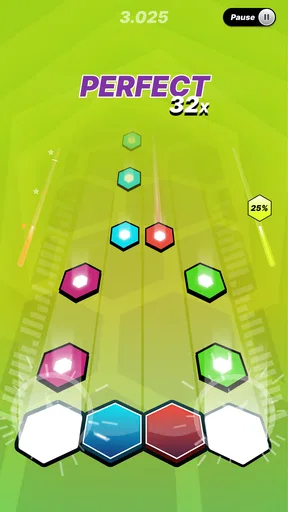
Our Review of Pop Beat: Star Hits & Music
 Analysis by Appyee
I like rhythm games best when the first song feels inviting rather than like a test, and Pop Beat: Star Hits & Music is aimed squarely at that quick, music-led kind of play. It is a free music game from Supercharge Mobile, with a Everyone age rating. Its catalogue is associated with well-known performers including Drake, Sia, and The Killers, so the appeal is easy to understand if familiar pop songs make tapping along more fun for you.
For a first-time player, the main question is less whether the premise sounds appealing and more whether the timing feels satisfying on your own phone. A rhythm game can be lively without demanding a long session, but it can also become frustrating if the screen is busy or the timing does not suit you. I would approach this as a casual game to try in short bursts, then decide whether its song selection and challenge keep you coming back.
Getting Started with Pop Beat
Starting off with Pop Beat: Star Hits & Music is a breeze. A quick download and you're off to the races. The interface is slick and intuitive, which is always a bonus for someone like me who just wants to jump right into the action. You're greeted with a vibrant home screen that highlights popular hits and new challenges, making it easy to see what's trending.
On Android, the game is listed for devices running version 7.0 or later, and its current version is 5.7.6. The listing shows 100K+ installs and a 4.4 average from around 1.5K ratings, alongside about 100 written reviews. Those numbers suggest an established audience, though they cannot tell you whether the controls will feel comfortable on your particular device or whether the available songs match your taste.
Before getting invested, I’d treat the first session as a quick fit check. Find a quiet moment, keep the phone steady, and try a song at a pace that leaves you time to watch the notes rather than simply react late. If you are playing on a small screen, holding the device in landscape or portrait should follow whatever the game itself presents most clearly; avoid changing grip mid-song, since even a slight shift can make taps less consistent.
Gameplay and Features
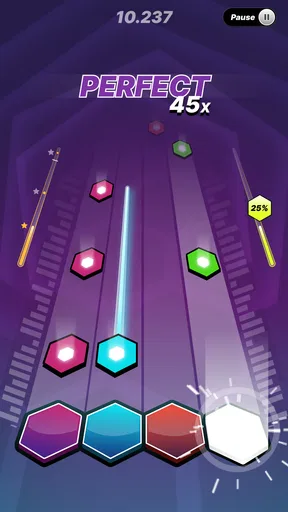
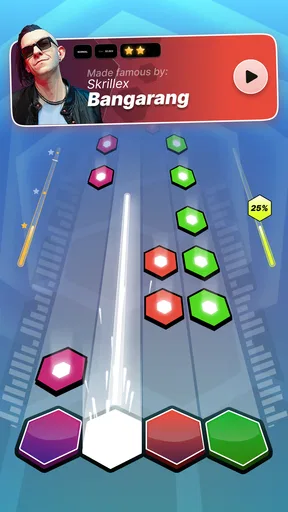
The gameplay is where Pop Beat really shines. It's a rhythm-based game where you tap, swipe, and hold to the beat of various pop songs. If you've ever played games like Guitar Hero or Dance Dance Revolution, you'll feel right at home here. The controls are responsive, which is crucial for a game that relies heavily on timing and precision.
One feature I particularly enjoyed is the "Star Challenge" mode. This mode throws you into songs with progressively harder patterns, pushing your skills to the limit. It's addictive, and I found myself saying "just one more song" more times than I'd like to admit. The app also includes a leaderboard, so you can see how you stack up against other players. It's a nice competitive touch that adds to the replay value.
For a newcomer, the useful distinction is between learning a song and chasing a score. On an early attempt, focus on recognising how taps, swipes, and holds are represented rather than trying to hit every note perfectly. Once the patterns stop feeling surprising, replaying with attention to accuracy is a more practical way to improve than tapping faster. The progressively harder Star Challenge can then serve as a clear next step when a familiar track starts to feel easy.
Leaderboards add motivation if you enjoy a visible benchmark, but they can also change the mood of a relaxing game. I would use them as a reason to replay a favourite track, not as proof that you are playing badly if your score is lower than someone else’s. If you want a private, low-pressure music break, ignore the competition and treat each run as practice; if you like comparing results, the ranking gives you another reason to return.
Music Selection and Audio Quality
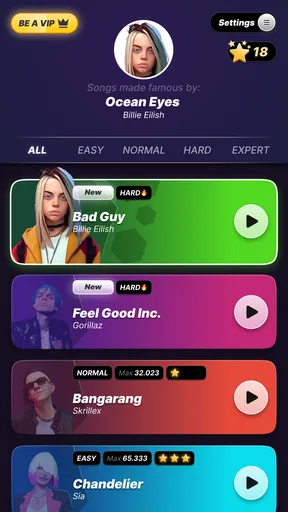
Now, let's talk about the music, which is arguably the heart of this app. The selection is vast, covering everything from chart-topping hits to lesser-known gems. I was pleasantly surprised to find some of my favorite tracks available right off the bat. The audio quality is top-notch, making every beat and note crystal clear. If you're using headphones, prepare for an immersive experience.
There’s also a neat feature where you can create custom playlists and even sync them with your music library. This means you can personalize your gaming experience to suit your musical tastes, which I found to be a fantastic addition.
Since the game’s draw depends heavily on music, I recommend checking whether the tracks you actually want to play are available before making it part of your routine. Familiar songs can make note patterns easier to anticipate, while an unfamiliar track may demand more attention to the visual cues. That is a useful trade-off: a favourite can make the first successful run feel rewarding, but a new-to-you song can keep the experience from becoming predictable.
The listing mentions well-known artists, but a performer’s name alone does not guarantee that every personal favourite is playable. I would browse the available selection rather than assume a particular track is included. If your main goal is to listen to music uninterrupted, a standard music player is the better fit; this game is for people who want to interact with the beat, not simply put a playlist on in the background.
Visuals and Design
Visually, the game is a treat. The graphics are colorful and engaging without being overwhelming. Each song has its unique backdrop, which keeps things fresh and exciting. The animations are smooth, and the overall design complements the energetic vibe of the music perfectly.
One thing I appreciated was the option to customize the visual effects. If you find the default effects too distracting (or not flashy enough), you can tweak them to your liking. It's these small details that make the app feel polished and user-friendly.
That visual flexibility matters most when you are trying to read incoming notes accurately. If a bright background competes with the pattern, simplifying effects is a sensible first adjustment; if the play field feels flat, more animation may make the session livelier. I’d change one visual setting at a time and then replay a familiar section, so it is easier to tell whether the change genuinely helps rather than merely looks different.
For a short everyday session, this can make the game easier to fit around other activities: play one song while waiting for a ride or take a few minutes between tasks, then stop without needing to settle in for a long campaign. It is less suitable when you need to keep your attention on a conversation, walk through a crowded place, or do anything that makes watching the screen unsafe. Rhythm play asks for your eyes and hands, so it works best when you can give it a little focused attention.
User Experience and Accessibility
The user experience is seamless, from downloading the app to navigating through its features. The developers have clearly put thought into making it accessible for all players. There's a helpful tutorial for newbies, but it's not overwhelming for seasoned rhythm gamers. The app also offers various difficulty levels, so whether you're a casual player or a rhythm game veteran, there's something for you.
I also appreciate that the app is regularly updated with new songs and features, keeping the content fresh and engaging. It's a testament to the developers' commitment to providing an excellent user experience.
Difficulty options are useful for more than beginners: they let you choose between a comfortable run and a session that asks for sharper timing. If you are missing notes repeatedly, stepping down is not giving up; it gives you room to learn the chart and regain a sense of the beat. Conversely, if a song feels too forgiving, a harder setting can make replaying it worthwhile. That gradual adjustment is more welcoming than treating every track as a fixed challenge.
The game is free to start, while in-app purchases are listed from $4.99 to $49.99 per item. I would try the free experience first and decide whether the available play is enjoyable before spending anything. Purchases may be a poor fit if you only want an occasional time-filler or prefer games with a single upfront cost. The age rating is Everyone, but that does not mean every player will enjoy the rhythm demands or want to make optional purchases.
Compared with a conventional music player, this turns listening into an active task; compared with a dance or instrument rhythm game, the phone screen makes it a compact option for quick sessions. That convenience comes with a clear limit: it is not the same as practising an instrument, and it is not a substitute for simply listening to an album. I would skip it if you dislike timing-based play, want a deep music-editing tool, or need a game that can hold your attention without looking at the screen.
Final Thoughts
In wrapping up, Pop Beat: Star Hits & Music delivers on its promise of providing a fun and engaging rhythm game experience. With its extensive music library, responsive gameplay, and vibrant visuals, it’s a must-try for anyone who loves music and gaming. Whether you’re looking to kill some time or challenge yourself to master every track, this app has got you covered.
So, if you're in the mood to tap to the beat and love a good challenge, give Pop Beat a try. It’s available for both Android and iOS, and trust me, you won't regret it!
My practical recommendation is to start with a familiar song, use the tutorial to learn the note gestures, and play at a difficulty where you can follow the beat without rushing. Then try a Star Challenge when you want a more demanding run, and use the visual settings if effects make the notes harder to track. That simple path gives a first-time player a fair chance to discover whether the game’s particular mix of pop music and quick reactions clicks.
If the songs you enjoy are represented and you like improving through short replays, this is an easy music game to consider. If you would rather listen passively, avoid leaderboards, or find tapping and swiping under time pressure tiring, another kind of music app will suit you better. I’d give it a try for the free entry point, keep purchases optional, and judge it by how enjoyable the first few tracks feel on your own device.
Verdict
Strengths of Pop Beat: Star Hits & Music
- Intuitive and user-friendly interface.
- Wide variety of popular music tracks.
- Engaging rhythm-based gameplay.
- Regular updates with new content.
- Offline mode available for play anywhere.
Limitations of Pop Beat: Star Hits & Music
- In-app purchases can be expensive.
- Advertisements can interrupt gameplay.
- Some songs require unlocking.
- Limited customization options.
- High battery usage during play.
Other Releases by Supercharge Mobile
View All
Drag Racing
Racing4.1

Hollywood Story®: Fashion Star
Adventure4.5

Nitro Nation: Car Racing Game
Racing4.4

Guitar Band: Rock Battle
Music4.5
Similar Picks in This Category
View All
Tiles Hop Music & Ball Game
AMANOTES PTE. LTD.4.3

Magic Tiles 3™ - Piano Game
AMANOTES PTE. LTD.4.6

Real Piano
Bilkon3.7

Piano Game: Classic Music Song
Dream Tiles Piano Game Studio4.0

Smash Colors: Music Ball Rush
BADSNOWBALL HONGKONG LIMITED4.2

Piano Music Go-EDM Piano Games
Joy Journey Music Games4.5
Frequently Asked Questions
What is Pop Beat: Star Hits & Music?
Pop Beat: Star Hits & Music is an engaging rhythm-based game that combines popular music tracks with dynamic gameplay. Players tap, swipe, and hold to the beat of their favorite songs, creating an immersive musical experience. The app provides a diverse library of hits and vibrant visuals, making it appealing for music lovers.
Is Pop Beat: Star Hits & Music free to download and play?
Yes, Pop Beat: Star Hits & Music is free to download and play. However, the app offers in-app purchases and subscriptions, which can enhance the user experience by unlocking additional songs, features, and ad-free gameplay. Users can enjoy many features without purchasing, but premium options are available for enthusiasts.
What platforms is Pop Beat: Star Hits & Music available on?
Pop Beat: Star Hits & Music is available for both Android and iOS devices. Users can download it from the Google Play Store or the Apple App Store. The app is optimized for smartphones and tablets, ensuring a seamless experience across different devices and screen sizes.
Does Pop Beat: Star Hits & Music require an internet connection?
While Pop Beat: Star Hits & Music can be played offline, certain features such as downloading new songs and accessing leaderboards may require an internet connection. It's recommended to connect online periodically to enjoy the latest content and updates, ensuring the best overall experience.
Are there any age restrictions for playing Pop Beat: Star Hits & Music?
Pop Beat: Star Hits & Music is designed for players of all ages, offering a family-friendly gaming experience. However, due to the presence of in-app purchases, it's advisable for parents to supervise young children. Parental controls can be set to prevent unauthorized purchases, ensuring a safe environment.
Play our best games!


